
A custom 404 page is the navigation interface shown to users in the error response a server returns for URLs it cannot find. According to 2026 web analytics data, 2 to 4 percent of an average site's traffic lands on a 404 error page, and 87 percent of those users leave immediately when they see a default 404 page with no custom design. This loss is a recoverable metric: a custom 404 page with a search box and links to popular content wins those users back.
Where the 404 Status Code Sits in the HTTP Protocol
An HTTP 404 response is a standard status code indicating that the server cannot find the URI requested by the client. The response does not distinguish between "temporary" and "permanent"; the server is only saying that the resource cannot be found right now. To signal permanent removal, use the HTTP 410 (Gone) status code.
When search engine crawlers receive a 404, they do not drop the URL from the index immediately. Googlebot recrawls a URL that returns 404 every few days and removes it from the index only after confirming that it consistently returns 404. This process usually takes between 7 and 30 days. As a result, a page that returns 404 because of a temporary server error does not drop out of the index if the problem is fixed quickly.
How a Default 404 Page Affects User Behavior
The default 404 page served by browsers and web servers is plain text with no navigation elements. Apache's default message is a one-line explanation under a "Not Found" heading. Nginx returns a similarly minimal error message.
A page like this gives users nowhere to go. They hit the back button or close the browser. In both cases the session ends and bounce rate rises. Custom-designed 404 pages, on the other hand, keep users on the site and preserve session duration. A site without a custom 404 page quietly loses 2 to 4 percent of its organic traffic, and this loss is invisible in most analytics reports.
Adding a Search Box to the 404 Page
The search box is the most important component of a 404 page. When users land on the wrong URL, they should be able to search the site to find the content they were looking for. The search box should sit near the top of the page's visual hierarchy and be at least 48 pixels tall.
Setting up a 404 search box with HTML and CSS:
<div class="search-404">
  <p>The page you are looking for could not be found. Use the search box below to find content.</p>
  <form action="/search" method="GET" role="search">
    <label for="search-input" class="visually-hidden">Site search</label>
    <input type="search" id="search-input" name="q"
           placeholder="Type a topic or keyword"
           autocomplete="off" autofocus>
    <button type="submit">Search</button>
  </form>
</div>
The autofocus attribute places the cursor directly in the search box when the page loads, so users can start typing without an extra click. The role="search" ARIA attribute identifies the form as a search form to screen readers, which keeps the page accessible.
Choosing Popular Content Links Strategically
Popular content links placed below the search box give users ready-made alternatives. Choose these links based on data, not at random: pull the 5 to 8 most-viewed pages of the last 30 days from GA4 or a similar analytics tool and add them to the 404 page dynamically.
Using dynamic content instead of a static list keeps the 404 page current. On WordPress, popular posts can be fetched with WP_Query:
$popular = new WP_Query([
    'posts_per_page' => 6,
    'meta_key'       => 'post_views_count',
    'orderby'        => 'meta_value_num',
    'order'          => 'DESC',
]);
This query returns the six most popular posts sorted by view count. The post_views_count meta field is updated by a view counter plugin or a custom function. A dynamic list makes sure users are always sent to current, engaging content.
Guiding Users into the Site Structure with Category Links
Alongside popular posts, the main category links should also appear on the 404 page. Even if users cannot find the specific content they were after, they can explore by going to the relevant category. Category links represent the top-level nodes of the site architecture and place users within the information hierarchy.
Keep the number of categories between 4 and 8. More links lead to decision paralysis and lower click-through rates. Adding a short description or the number of articles next to each category link makes it easier for users to pick the right one:
<nav class="category-nav-404" aria-label="Categories">
  <ul>
    <li><a href="https://seobaz.com/technical-seo">Technical SEO <span>(24 posts)</span></a></li>
    <li><a href="https://seobaz.com/content-strategy">Content Strategy <span>(18 posts)</span></a></li>
    <li><a href="https://seobaz.com/structured-data">Structured Data <span>(12 posts)</span></a></li>
    <li><a href="https://seobaz.com/performance">Performance <span>(15 posts)</span></a></li>
  </ul>
</nav>
The aria-label="Categories" attribute tells screen readers what this navigation is for. The post count works as social proof and signals how much content each category holds.
Soft 404 Errors and Checking for the Correct HTTP Response Code
A soft 404 is an anomaly in which the server returns "page not found" content together with a 200 OK status code. This misleads search engine crawlers. When Googlebot receives a 200 OK, it tries to index the page, and a page full of error content ends up in the index.
Search Console lists soft 404 errors as a separate category in the Indexing > Pages report. In a correct setup, the 404 page must return an HTTP 404 status code. In Nginx:
error_page 404 /404.html;
location = /404.html {
    internal;
}
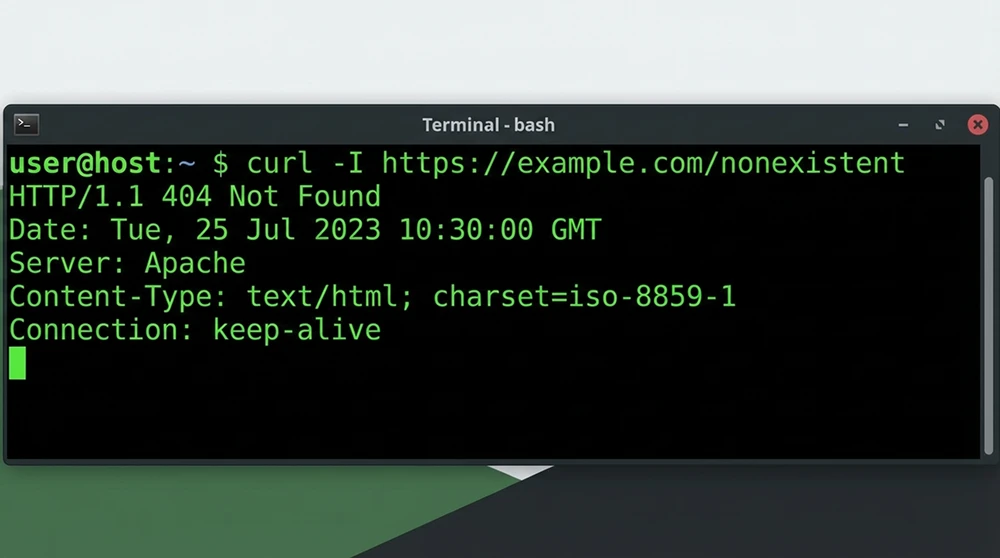
In Apache, the line ErrorDocument 404 /404.html is added to the .htaccess file. The critical check is that the 404.html page itself is served with a 404 status code, not 200 OK. Verify the returned HTTP status code with the command curl -I https://site.com/non-existent-page.
Automatic URL Suggestions on the 404 Page
Detecting a typo in the URL a user entered and suggesting the correct one is the most advanced feature a 404 page can have. The Levenshtein distance algorithm calculates the character similarity between the mistyped URL and existing URLs and suggests the closest match.
A simple URL suggestion mechanism in JavaScript:
function levenshtein(a, b) {
  const matrix = Array.from({ length: a.length + 1 }, (_, i) =>
    Array.from({ length: b.length + 1 }, (_, j) => (i === 0 ? j : j === 0 ? i : 0))
  );
  for (let i = 1; i <= a.length; i++) {
    for (let j = 1; j <= b.length; j++) {
      matrix[i][j] = Math.min(
        matrix[i - 1][j] + 1,
        matrix[i][j - 1] + 1,
        matrix[i - 1][j - 1] + (a[i - 1] !== b[j - 1] ? 1 : 0)
      );
    }
  }
  return matrix[a.length][b.length];
}

const currentPath = window.location.pathname;
const siteUrls = ['/technical-seo', '/content-strategy', '/structured-data'];
const suggestions = siteUrls
  .map(url => ({ url, distance: levenshtein(currentPath, url) }))
  .sort((a, b) => a.distance - b.distance)
  .slice(0, 3);
This algorithm compares the requested path with the pool of existing URLs and suggests the three closest matches. A user who types /technicl-seo is offered /technical-seo. The URL pool can be pulled dynamically from the sitemap.xml file or an API endpoint.
Tracking 404 Page Traffic with GA4
Knowing which URLs return 404 and where the traffic to those URLs comes from determines what to fix first. A custom GA4 event for the 404 page collects this data in a structured way:
if (document.title.includes('404') || document.querySelector('.page-404')) {
  gtag('event', 'page_not_found', {
    page_location: window.location.href,
    page_referrer: document.referrer,
    requested_path: window.location.pathname
  });
}
This event records the requested URL and the referrer on every 404 view. In GA4, create an Explore > Blank report and filter for the page_not_found event. The requested_path dimension reveals the URLs that hit 404 most often, and the page_referrer dimension shows which sources send traffic to them. 404 traffic from internal links points you to broken links on your own site.
The Search Console 404 Report and Managing Crawl Errors
In Search Console's Indexing > Pages report, the "Not found (404)" category lists URLs that returned a 404 when Googlebot crawled them. The list contains two different kinds of data: URLs that were genuinely deleted and URLs that never existed.
Genuinely deleted URLs are pages that were previously indexed and received traffic. These URLs need a 301 redirect. URLs that never existed are faulty links from external sites or crawler errors. They do not need a 301 redirect; returning 404 is the correct behavior.
To tell them apart, cross-check the URLs in the Search Console report against historical traffic data in GA4. URLs that once received traffic should be redirected, while URLs that never did should be left as they are.
Keeping the 404 Page Out of the Index
The 404 page should not be indexed. When it returns an HTTP 404 status code, Googlebot does not index it anyway. In a soft 404 situation (200 OK plus error content), however, the page can end up indexed. As an extra safeguard, add a <meta name="robots" content="noindex"> tag to the HTML <head> of the 404 page.
The robots meta tag creates a second layer of protection that is independent of the server configuration. Even if the server mistakenly returns 200 OK, the noindex tag prevents the page from being indexed. This two-layer protection reliably keeps the 404 page out of search results.
Finding and Fixing Broken Internal Links in Bulk
A significant share of the traffic that lands on the 404 page comes from broken internal links. Content updates, URL changes and deleted pages produce these broken links. To find them in bulk, use Screaming Frog or a similar crawler, which scans every link on the site and lists the targets that return 404.
As a lightweight command-line alternative:
wget --spider -r -l 3 -o crawl.log https://site.com
grep -i "404" crawl.log | grep -oP 'https?://[^\s]+' > broken-links.txt
This command crawls the site up to three levels deep and saves every URL that returns 404 to broken-links.txt. Each URL in the output is reported together with its source page. The fix is either to update the target URL or to remove the link from the source page.
Expert Note: The Real Cost Nobody Pays Attention To
In our hands-on experience, 404 page optimization is one of the areas SEO teams spend the least time on, yet it delivers some of the highest returns. In one e-commerce project, after we added a search box and links to the six best-selling products to the 404 page, 34 percent of 404 traffic moved on to product pages. That means recovering 4,000 of the 12,000 users who landed on the 404 page each month. The fix took two hours and the effect is permanent. Even so, many sites still use the default Apache or Nginx 404 page. The irony is that teams spend weeks on technical SEO audits but won't set aside even two hours for the 404 page.
Visual Design and Brand Consistency on the 404 Page
The 404 page should follow the site's main design language. The header, footer and navigation menu should stay in place. When users land on a 404 page, they should still feel they are on the same site. Removing the navigation menu takes away their ability to move around the site and increases the exit rate.
The tone of the error message should match the brand's voice. A short, helpful message free of technical jargon is enough. A line such as "The page you are looking for may have been moved or removed" explains the situation. It should be followed by the search box and alternative links so the user has a way forward.
Handling 404s in JavaScript SPA Architectures
In single-page applications (SPAs) built with React, Vue or Angular, 404 handling happens on the client, not the server. With client-side routing, entering a route that does not exist makes the application render a default component. The HTTP status code, however, is still 200 OK, because the server has successfully served index.html.
Solving this soft 404 problem requires SSR (Server-Side Rendering) or prerendering. Creating a custom 404 page in Next.js is straightforward:
// pages/404.js
export default function Custom404() {
  return (
    <div className="error-page">
      <h1>Page Not Found</h1>
      <p>The content you are looking for may have been moved or removed.</p>
      <SearchBox />
      <PopularPosts />
    </div>
  );
}
Next.js automatically serves this file with a 404 status code. In Nuxt.js, the error.vue layout file does the same job. In SPA architectures, returning a 404 status code on the server is the most critical step; otherwise every error page is flagged as a soft 404.
Configuring the 404 Page on Multilingual Sites
On sites that publish content in more than one language, the 404 page should match the language version the user is in. A user who reaches /en/non-existent-page should see an English 404 page, and a user who reaches /tr/olmayan-sayfa should see a Turkish one.
Language-based 404 handling in Nginx:
location /en/ {
    error_page 404 /en/404.html;
}

location /tr/ {
    error_page 404 /tr/404.html;
}

location / {
    error_page 404 /404.html;
}
The 404 page in each language version should include a search box, popular content and category links in that language. Hreflang tags should not be added to 404 pages, because these pages should not be indexed and hreflang applies only to indexable pages.
Using Structured Data on the 404 Page
Adding structured data to 404 pages brings no direct SEO benefit because these pages are not indexed. Marking up the navigation elements on the 404 page with SiteNavigationElement schema can, however, help the crawler understand the page structure.
A more practical approach is to add SearchAction schema to the 404 page to define what the search box does:
{
  "@context": "https://schema.org",
  "@type": "WebSite",
  "url": "https://site.com",
  "potentialAction": {
    "@type": "SearchAction",
    "target": "https://site.com/search?q={search_term_string}",
    "query-input": "required name=search_term_string"
  }
}
This schema should already be on the home page. Repeating it on the 404 page is not required, but it makes it easier for the crawler to recognize the search box on that page.
Redirect Strategy: 404 or 301?
Whether to return a 404 or set up a 301 redirect for a deleted or moved page depends on the page's past performance. Pages that received organic traffic, earned backlinks and had an established place in the index should be 301-redirected to the most relevant destination. The redirect passes the existing link equity to the new page.
For URLs that never received traffic, have no backlinks and were never indexed, returning a 404 is the right approach. Redirecting these URLs to the home page with a 301 is treated as a "soft 404" because there is no content relationship between the source URL and the destination. When redirecting in bulk, evaluate each URL's backlink profile and traffic history individually.
404 Page Performance Optimization
Load speed matters on the 404 page just as much as on any other page. The user has already had a negative experience, and a slow-loading error page makes it worse. The 404 page should be kept as light as possible.
Unnecessary JavaScript libraries, heavy images and third-party scripts should be removed from the 404 page. The search box and popular content links can be built with lightweight HTML and CSS. If an AJAX call is used for the dynamic popular content list, it should be triggered asynchronously after the page has loaded. The core content structure should render instantly as static HTML, with dynamic components loading afterwards.
Setting Up Automatic 404 Monitoring and Alerts
An automatic monitoring system should be in place to detect 404 errors as they happen. A mechanism that filters 404 responses from log files and sends an alert when a threshold is exceeded catches broken link problems early.
A simple monitoring script run by a cron job on Linux servers:
#!/bin/bash
COUNT=$(grep "HTTP/1.1\" 404" /var/log/nginx/access.log | wc -l)
THRESHOLD=100

if [ "$COUNT" -gt "$THRESHOLD" ]; then
  echo "$COUNT 404 errors detected in the last 24 hours" | \
  mail -s "404 Alert: Threshold Exceeded" seo@company.com
fi
Run daily, this script sends an email alert when the number of 404 errors exceeds the defined threshold. For a more advanced setup, the ELK Stack or a similar log analysis platform can be used. The real benefit of an automatic alert is that a broken link is noticed on the day it appears, not weeks later in Search Console.
404 Page Components Worth A/B Testing
Run controlled tests to find out which combination of components on the 404 page produces the lowest exit rate. The variables worth testing are:
- Search box position affects click-through rate depending on whether it sits at the top or in the middle of the page; placing it at the top usually produces 20 percent higher usage.
- Number of popular content links should be tested in variants of 3, 6 and 9; the six-link version delivers the best click distribution in most tests.
- Use of visual elements should be measured to see whether adding an illustration or icon softens the perceived severity of the error message.
- CTA button text should be compared across variants such as "Back to Home" and "Explore Our Content" to see which earns more clicks.
Edge Caching and 404 Page Consistency
Caching 404 responses at the CDN layer requires care. By default, most CDNs do not cache error responses. In some configurations, however, 404 responses can be cached for a short time. In that case, a URL that has been fixed keeps returning 404 until the CDN cache expires.
On Cloudflare, use Page Rules or Cache Rules to control how 404s are cached. Keeping the Edge TTL for error responses at 0 or very short (30 seconds) ensures fixes take effect immediately. The custom 404 page itself can be cached as a static asset. As long as the page structure does not change, the CDN cache provides a performance advantage and reduces unnecessary requests to the origin server.



