A video transcript is a complete text record of the speech and sounds in a video, and a subtitle is a timestamped version of that record synchronized to the video. Search engines cannot always turn the speech in a video into text; a transcript on the page makes that content directly readable. Without a text record, video content remains "dark data" that algorithms cannot reach, and search engines are structurally unable to understand it.
The Algorithmic Accessibility Problem of Video Content
Search engines are built on text-based indexing. Googlebot parses the HTML text on a web page, tokenizes the words and extracts topical signals. Video content, by contrast, carries visual and audio data, a layer that text-based indexing cannot reach directly. Google's ability to understand video is improving, but as of 2026 it still cannot match video content to text-based queries with full accuracy.
A transcript is the bridge that closes this accessibility gap. A 10-minute video produces an average of 1,500–2,000 words of text. Once added to the page, this text lets the bot match the video content with text-based queries. A transcript is therefore not a "text translation" of the video but a structural prerequisite for the video's algorithmic discoverability.
The Technical Difference Between Transcripts and Subtitles
A transcript is the full spoken content of a video written out as plain text. Timestamps are either absent or optional. It sits on the page as an independent block of text and is read directly by the bot. Users can read the content from the transcript without watching the video.
Subtitles (or captions) are timestamped text fragments. Each fragment is synchronized with a specific second of the video. They are produced in SRT, VTT and SBV formats and rendered over the video by the video player. Subtitles support the viewing experience, while the transcript enriches the page's text content. From an SEO perspective, the transcript is text content that gets indexed directly. Subtitles, on the other hand, are an external file interpreted by the video player and are evaluated by Googlebot only indirectly.
Closed Captions vs. Open Captions
Closed captions (CC) are subtitles the user can turn on and off. They are loaded into the video player as an external file (SRT, VTT), and viewers show or hide them as they like. Open captions are subtitles permanently burned into the video's visual layer. They are added during video editing and cannot be turned off.
For SEO, closed captions are the better choice. A closed caption file (VTT/SRT) holds the text content in a separate file, and that file can be read programmatically. YouTube indexes closed caption files and uses them for matching in video search results. Open captions, by contrast, are embedded in the image; they cannot be accessed as text and cannot be indexed. So open captions provide visual accessibility but not algorithmic accessibility.
SRT, VTT and SBV Subtitle Formats
Subtitle files are produced in three common formats. Each format is supported by different platforms and video players.
SRT (SubRip Subtitle) is the most common subtitle format. It contains a sequence number, a time range and text:
1
00:00:05,000 --> 00:00:10,000
Crawl budget is the total crawl capacity
Googlebot allocates to a site.

2
00:00:10,500 --> 00:00:16,000
Optimizing this capacity increases
indexing speed on large sites.
VTT (Web Video Text Tracks) is the standard format for HTML5 video players. It is integrated directly into HTML with the <track> element. It is similar to SRT but offers additional features (styling, positioning):
WEBVTT

00:00:05.000 --> 00:00:10.000
Crawl budget is the total crawl capacity
Googlebot allocates to a site.

00:00:10.500 --> 00:00:16.000
Optimizing this capacity increases
indexing speed on large sites.
SBV (SubViewer) is a simple format supported by YouTube. It can be uploaded directly in YouTube Studio.
Subtitle Integration in an HTML5 Video Player
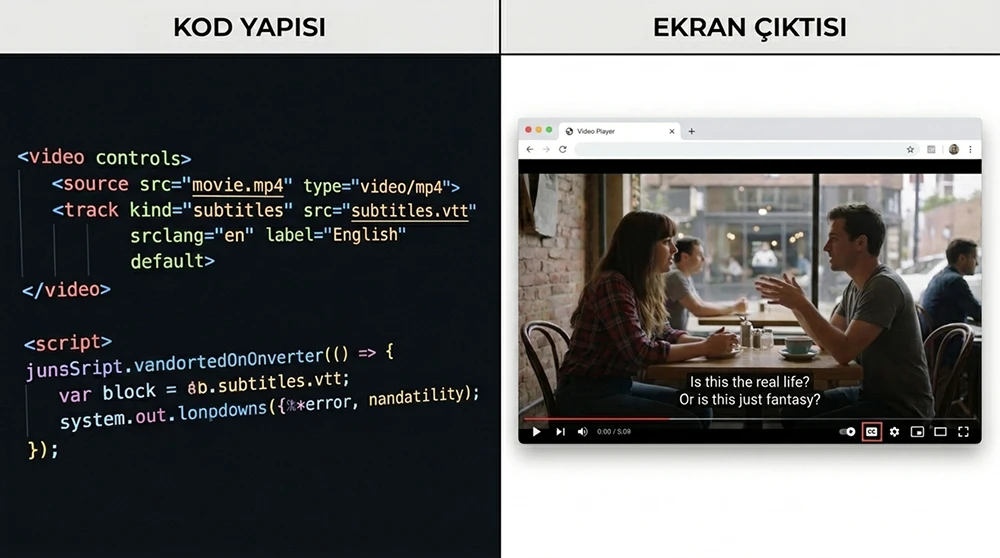
The HTML5 <video> element integrates the subtitle file directly through the <track> child element. This integration uses the browser's native subtitle support and requires no additional JavaScript:
<video width="1280" height="720" controls>
  <source src="/videos/technical-seo-guide.mp4" type="video/mp4">
  <track src="/subtitles/technical-seo-guide-tr.vtt"
         kind="subtitles" srclang="tr" label="Türkçe" default>
  <track src="/subtitles/technical-seo-guide-en.vtt"
         kind="subtitles" srclang="en" label="English">
</video>
kind="subtitles" declares a translation of the speech, while kind="captions" declares full captions describing both speech and sound effects. The default attribute makes the subtitles start switched on. Multilingual subtitle support can be offered with multiple <track> elements. The srclang attribute declares the subtitle language and lets the browser select a track automatically based on its language preference.
Managing and Indexing YouTube Subtitles
YouTube generates automatic captions for uploaded videos. These auto-generated captions are created with speech recognition technology, and their error rate varies with the language, audio quality and speaker. Errors rise noticeably in agglutinative languages such as Turkish and in videos dense with technical terms, so automatic captions are only a starting draft.
From the YouTube Studio > Subtitles menu, you can edit automatically generated captions or upload your own SRT/VTT file. Manual editing brings the error rate close to zero and directly improves caption quality. YouTube uses caption text for matching in video search results. When a user searches for "crawl budget optimization", a video whose captions contain that term stands out. Our hands-on experience shows that videos with manually uploaded captions earn click-through rates 30% higher on average in YouTube search results than videos with only automatic captions.
Ways to Integrate the Transcript Into Page Content
Adding the transcript to the page gives the bot direct access to the video's text content. There are three ways to do this. The first is to place the full transcript below the video. This keeps all the text visible on the page, where the bot indexes it directly. With long transcripts, though, the page can become very long.
The second is to put the transcript inside a collapsible accordion panel. The user opens the panel by clicking a "Show Transcript" button. Google indexes content in hidden panels under mobile-first indexing but may assign it lower weight than visible content. The third is to present the transcript on a separate subpage. The video page links to it with a "Full transcript" link. This method keeps the video page's length in check but moves the SEO value of the transcript content to the separate page.
The SEO Value and Vocabulary Richness of Transcript Content
A 10-minute video produces an average of 1,500–2,000 words of text. This text dramatically increases the page's word count and topical depth. When a 1,500-word transcript is added below a 500-word blog post, the total page content reaches 2,000 words. This increase broadens the page's potential to match long-tail queries.
Because transcript text is natural spoken language, it closely matches how users actually search. When people type into search engines, they tend to use conversational phrasing. The query "how to optimize crawl budget" naturally overlaps with the phrasing an expert would use in a video. This overlap exists because a transcript offers a vocabulary pool that differs from, and complements, written content.
Automatic Transcript Generation and AI Tools
Producing transcripts manually is time-consuming: transcribing a 10-minute video takes an average of 30–45 minutes of work. AI-based speech-to-text tools automate this process. Whisper (OpenAI), Google Cloud Speech-to-Text and AssemblyAI are services that convert speech to text with high accuracy.
Whisper is an open-source model and can be run locally:
# Generating a transcript with Whisper
pip install openai-whisper
whisper video.mp4 --language Turkish --output_format srt
This command converts the speech in a Turkish video into a transcript file in SRT format. To get VTT output, use the --output_format vtt parameter. Whisper's accuracy for Turkish is in the 90–95% range. The remaining 5–10% of errors stem from specialized terms, technical jargon and poor audio quality. Manually reviewing the automatically generated transcript and correcting errors is a mandatory quality assurance step.
Timestamped Transcripts and User Experience
A timestamped transcript shows which second of the video each text fragment corresponds to. When the user clicks a specific section in the transcript, the video plays from that point. This interaction makes it easier for users to navigate video content and increases dwell time.
<div class="transcript">
  <p><a href="#" onclick="video.currentTime=5; return false;">
    <span class="timestamp">[00:05]</span>
    Crawl budget is the total crawl capacity Googlebot allocates to a site.
  </a></p>
  <p><a href="#" onclick="video.currentTime=10; return false;">
    <span class="timestamp">[00:10]</span>
    Optimizing this capacity increases indexing speed on large sites.
  </a></p>
</div>
In this structure, each paragraph links to the relevant second of the video. Users scan the transcript to find what they need and jump straight to that part of the video. Google may show this clickable structure in the SERP as "key moments" and offer direct links to specific parts of the video.
VideoObject Schema and Transcript Integration
VideoObject schema describes a video as structured data. Its transcript field declares the video's full text record in the structured data layer:
{
  "@context": "https://schema.org",
  "@type": "VideoObject",
  "name": "Crawl Budget Optimization Guide",
  "description": "Crawl budget management and crawl efficiency",
  "thumbnailUrl": "https://example.com/images/thumbnail.webp",
  "uploadDate": "2026-04-13",
  "duration": "PT10M30S",
  "contentUrl": "https://example.com/videos/crawl-budget.mp4",
  "transcript": "Crawl budget is the total crawl capacity Googlebot allocates to a site. Optimizing this capacity..."
}
The transcript field declares the video's full text to Google as structured data. This field is a signal layer that works independently of the HTML transcript on the page. Using the HTML transcript and the schema transcript together creates a two-layer signal.
Multilingual Subtitles and Their International SEO Impact
Adding subtitles in more than one language expands a video's potential to appear in search results across languages. When a Turkish video is offered with English subtitles, it can also match English search queries. YouTube indexes multilingual subtitles independently.
Multilingual subtitles in an HTML5 video player:
<track src="/subtitles/tr.vtt" kind="subtitles" srclang="tr" label="Türkçe" default>
<track src="/subtitles/en.vtt" kind="subtitles" srclang="en" label="English">
<track src="/subtitles/de.vtt" kind="subtitles" srclang="de" label="Deutsch">
Create a separate VTT file for each language. The translation should be professional quality, because automatic translation tools can get technical terms and context-dependent phrases wrong. Each additional language opens the video to people searching in that language; how much it gains depends on the demand in that language.
How Transcripts Affect Citation in LLM-Based Answer Engines
LLM-based systems (ChatGPT, Perplexity, Gemini) rely on text-based information extraction. Video is not text, so these systems cannot access it directly. A transcript turns video content into text, which lets an LLM index that information and use it in its answers.
When a user asks "how do I optimize crawl budget", the LLM pulls the relevant information from the transcript text on the page and can use it as a source in its answer. Without a transcript, the video remains "embedded media with unknown content" from an LLM's perspective. The transcript is video content's only access point to the AI answer ecosystem, and without that access point, the video's entire informational value stays hidden from AI systems.
Accessibility Standards and WCAG Video Requirements
The WCAG 2.1 standard defines multiple accessibility requirements for video content. At Level A (the mandatory minimum), captions or a text alternative are required for prerecorded videos. At Level AA, real-time captions are also required for live videos. At Level AAA, sign language interpretation is added.
In Türkiye, the web accessibility obligations of public institutions also cover video content. Publishing videos without captions results in WCAG non-compliance. Users with hearing impairments cannot access video content without captions. Captions and transcripts are therefore not just an SEO tactic but a basic accessibility right. At this point, SEO and accessibility goals overlap completely.
Manually Correcting Automatic Caption Quality
AI-generated captions have an error rate of 5–15%. These errors come from technical terms, proper names, poor audio quality and accented speech. The term "crawl budget" may be mistranscribed as "coral budget", and "Googlebot" as "Google bot" or "Google bought".
Manual correction is a mandatory quality assurance step after automatic generation. The caption editing interface in YouTube Studio lets you edit each timestamped fragment one by one. Desktop applications such as Aegisub and Subtitle Edit allow detailed editing of SRT/VTT files. Publishing automatic captions without correcting them damages professional perception, and captions containing incorrect information directly lower brand credibility.
YouTube Key Moments and Clip Schema Integration
In video search results, Google offers direct links to specific parts of a video through the "key moments" feature. YouTube can create key moments automatically by analyzing video content. However, manually defined key moments are more accurate and more strategic.
On YouTube, key moments are defined by adding timestamps to the video description:
0:00 Introduction
0:45 What Is Crawl Budget
2:30 Factors That Affect Crawl Budget
5:15 Robots.txt Optimization
8:00 Verification With Log Analysis
These timestamps trigger YouTube's key moments feature. For videos hosted on your own site, Clip schema is used:
{
  "@type": "Clip",
  "name": "What Is Crawl Budget",
  "startOffset": 45,
  "endOffset": 150,
  "url": "https://example.com/video#t=45"
}
Clip schema can show specific parts of a video as separate results in the SERP and let users jump directly to each part.
A Transcript Strategy for Podcasts and Audio Content
A transcript strategy is not limited to videos. Podcasts, webinar recordings and audio files also gain algorithmic accessibility through a text record. A 30-minute podcast produces 4,000–5,000 words of text. This text dramatically deepens the podcast page's content and broadens its long-tail query matching.
Adding the podcast transcript to the episode page in the RSS feed makes each episode an independent SEO asset. Apple Podcasts and Spotify have started supporting caption/transcript features. However, the primary SEO value comes from publishing the transcript on your own website; transcripts on third-party platforms do not contribute to your site's index.
The Traffic Impact of Combining Video SEO and Transcripts
Behind the scenes, the reality is different: many sites produce a video, embed it on a page and assume they've "done video SEO". But embedding a video does not, on its own, make that video searchable. A video embed provides a visual experience; a transcript opens up that experience to text-based search. The two work on different layers and do not replace each other.
The combination of video embed + transcript + VideoObject schema + subtitle file is the full formula for a video's SEO potential. With all four in place, the video gives both traditional search engines and AI answer systems everything it can say about itself; whether it is shown is still the search engine's decision. Leave out any one of them, and one layer of that potential shuts off.
Transcript and Subtitle Quality Checklist
Apply these transcript and subtitle checks to every video release and technical audit:
- Add a subtitle file in VTT or SRT format to every video: integrate it with the <track> element in an HTML5 video player and with the Studio subtitle upload tool on YouTube.
- Manually correct automatically generated captions: fix errors in technical terms, proper names and contextual expressions to bring accuracy up to 99%.
- Add the transcript visibly to the page content: present the full transcript below the video or inside an accordion panel so the bot can index it directly.
- Include the transcript field in VideoObject schema: declare the video's text record in the structured data layer to produce a two-layer signal.
- Add timestamped descriptions to YouTube videos: trigger the key moments feature to gain section-level visibility in video search results.
- Assess the need for multilingual subtitles: add subtitles in additional languages with professional translation to videos that have an international target audience.
A Sustainable Cycle for Transcript Management
Here is the point that looks right in theory but falls apart in practice: adding transcripts and subtitles to the first few videos and then skipping this step for later ones causes optimization gaps to accumulate over time. If 10 out of 50 videos have transcripts and 40 do not, 80% of the video library remains algorithmically dark.
The sustainable approach is to make transcript and subtitle production a mandatory step in the video publishing process. Shoot and edit the video, generate an automatic transcript with Whisper, correct the errors, create a VTT file, add the transcript to the page and update the VideoObject schema. When this six-step process becomes the standard workflow for every video release, the entire video library gains algorithmic accessibility. The transcript is the text layer of a video's digital identity. Without this layer, a video remains a silent, inaccessible asset for search engines and AI systems.



