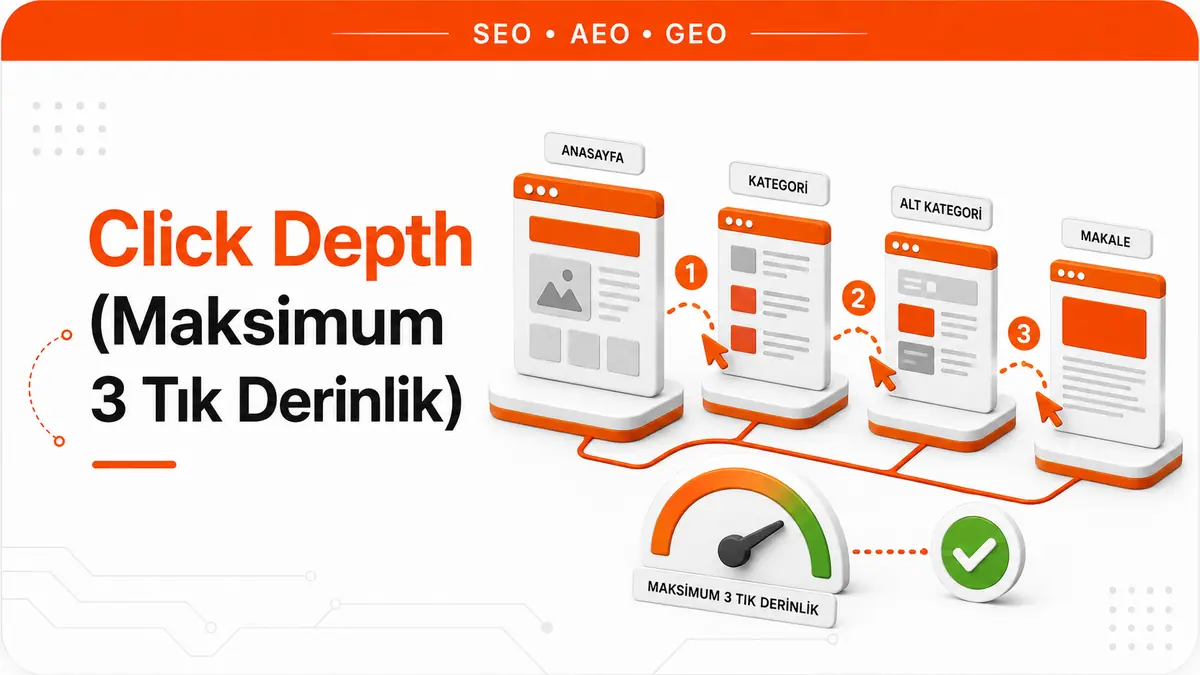
Click depth is the minimum number of clicks needed to reach a page from the homepage. The further a page sits from the homepage, the fewer links lead to it, so deep pages are usually discovered later and crawled less often. This metric is a site architecture decision that directly determines both a page's accessibility for users and its discoverability for bots.
The Algorithmic Link Between Click Depth and Crawl Priority
When Googlebot crawls a site, it starts at the homepage and reaches inner pages by following internal links. Each layer of clicks increases the bot's cost of reaching that page. Pages reachable in 1 click from the homepage have the highest crawl priority. Pages 2 clicks away get one notch lower priority. At 3 clicks and beyond, the bot weighs whether to reach the page against its crawl budget.
This behavior is the structural counterpart of PageRank distribution. Link equity on the homepage is passed to first-layer pages. As it moves from these pages to the second layer and from there to the third, the amount of equity at each layer decreases. So click depth is an indicator not only of crawl priority but also of the level of authority a page inherits. Deep pages are both crawled less and accumulate less authority.
The Technical Rationale Behind the 3-Click Rule
The principle that "every page should be reachable within 3 clicks of the homepage" is a common guideline in the SEO world. Its technical rationale has three dimensions. The first is crawl efficiency: Googlebot's crawl budget is limited, and reaching deep pages consumes that budget unnecessarily. The second is link equity distribution: because equity is divided at each layer, pages on the 4th and 5th layers can't accumulate meaningful authority. The third is user experience: pages that require 4+ clicks increase the risk of losing users along the way.
However, this rule is a guiding principle, not an absolute one. On a 10,000-page e-commerce site, keeping every page within 3 clicks is mathematically challenging. In that case, the 3-click rule should be prioritized for the most strategically valuable pages (conversion pages, content with high traffic potential), and low-priority pages can be left on the 4th layer.
Measuring Click Depth With Screaming Frog
The most reliable way to measure click depth is a site crawl with Screaming Frog. Screaming Frog automatically calculates how many clicks each page is from the homepage and reports it in the "Crawl Depth" column.
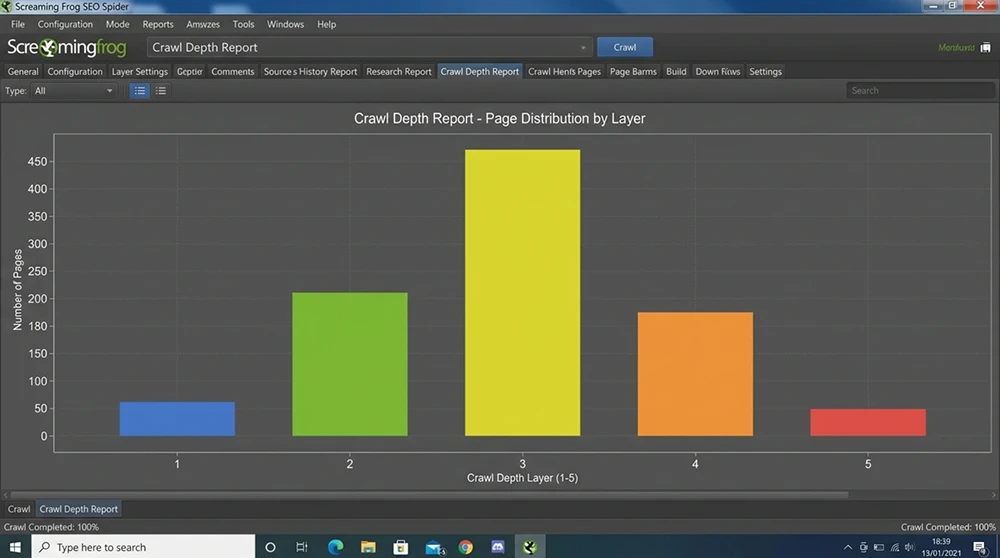
Start a crawl in Screaming Frog and, once it's complete, switch to the "Internal" tab. Click the "Crawl Depth" column to sort pages by depth. Filter and list the pages at a depth of 4 or more. By examining the URL structure and content type of these pages, decide which pages need to be pulled up to a depth of 3 clicks. Screaming Frog's "Crawl Tree Graph" visualization presents the layer structure of the site architecture as a tree diagram and visually reveals deep branching points.
Flat vs. Deep Site Architecture
Site architecture sits on a spectrum between two extremes. A flat architecture has few layers and wide branching. The homepage links directly to hundreds of subpages. In this structure, click depth is low, but the link equity on the homepage is split across a large number of pages, so each page's share gets smaller.
A deep architecture has many layers and narrow branching. The homepage links to a few category pages, categories to subcategories, and subcategories to products. In this structure, click depth is high, and pages in the lower layers are at a disadvantage for both crawling and authority. The optimal architecture is a balance between these two extremes: a 3-layer structure where each layer has a reasonable amount of branching optimizes both accessibility and equity distribution.
Controlling Click Depth With Internal Linking Strategy
Click depth is determined not by URL hierarchy alone but by internal link structure. A page with a deep URL structure like /blog/category/subcategory/article/ has a click depth of 1 if it receives a direct internal link from the homepage. Conversely, a page with a shallow URL structure like /services/ has an effectively infinite click depth if no page links to it.
This distinction is critical: URL depth and click depth are different concepts. URL structure represents the directory hierarchy. Click depth measures the actual link path. To lower the click depth of a page with a deep URL, it's enough to give that page a direct internal link from the homepage, the navigation menu or high-authority pages. Controlling click depth through internal linking strategy, without changing the URL structure, is the lowest-friction optimization method.
The Impact of the Main Navigation Menu on Click Depth
The main navigation menu (header menu) is a structural element repeated on every page of the site. Links in the menu give 1-click access to the target pages from the homepage. A mega menu structure can provide direct access to category, subcategory and even product pages. This structure brings the click depth of hundreds of pages down to 1.
However, having too many links in a mega menu carries two risks. The first is link equity being split across too many pages. The second is a more cluttered user experience. An optimal mega menu structure lists primary categories directly, presents secondary categories in a hover dropdown and highlights the most strategic subpages. Rather than putting every product in the mega menu, including only the most strategically valuable pages preserves the balance between click depth and equity distribution.
How Breadcrumb Navigation Contributes to Click Depth
Breadcrumb navigation shows both users and bots a page's position in the hierarchy. Each breadcrumb item contains a clickable link to the parent category. These links create a natural internal link flow from child pages to parent categories and strengthen the authority of parent categories.
The direct effect of breadcrumbs on click depth is limited, because breadcrumbs link upward (child > parent), not downward (parent > child). But breadcrumbs reduce the number of clicks users need to reach their goal by offering an alternative way to move between pages. Paired with BreadcrumbList schema, breadcrumbs improve both the user experience and how well algorithms understand the site structure. Implementing breadcrumbs consistently across the site and supporting them with schema is a basic checkpoint.
Footer Links and Sitewide Linking Strategy
The footer is a second navigation layer repeated across the site. Links in the footer give 1-click access to target pages from every page. This makes the footer a powerful tool for click depth optimization. Linking to the about, contact, services and important content pages from the footer brings their click depth down to 1.
However, piling dozens of links into the footer spreads link equity unnecessarily and can create a "link farm" impression. The optimal range for a footer is 15 to 25 links. The most strategic pages (service pages, pillar pages, conversion pages) should be in the footer; blog posts and low-priority pages should be removed from it.
The Relationship Between Pagination and Click Depth
Pagination on blog archives and product listing pages can dramatically increase click depth. If a blog with 100 posts shows 10 posts per page, 10 paginated pages are created. A post on the last page is at least 4 clicks from the homepage: Homepage > Blog > Page 5 > Page 10 > Post.
There are three approaches to solving this problem. The first is increasing the number of items shown per page; showing 20 or 30 items instead of 10 reduces the total number of paginated pages. The second is using "load more" or infinite scroll; in this structure, all items sit on a single page and click depth stays at 1. The third is linking directly to important posts from category and tag pages; these links bypass the pagination chain and lower the click depth of deep posts.
Orphan Pages and the Infinite Click Depth Problem
An orphan page is a page that receives no internal links from any page on the site. Its click depth is effectively infinite, because the bot can't reach it by following internal links. Orphan pages can only be discovered through the XML sitemap or external links.
To detect orphan pages in Screaming Frog, complete a crawl in "Crawl" mode, then use the "Analytics" or "Search Console" integration to find URLs that receive traffic but weren't found in the crawl. Bring the orphan pages you detect into the site structure by linking to them internally from the relevant category or pillar page. Every orphan page should receive a link from at least one parent page related to its topic. In our field experience, on sites with 500+ pages, an average of 8–12% of pages are orphans, and bringing these pages into the internal link network delivers an average 25–40% increase in their organic traffic within 4–6 weeks.
Controlling Depth With a Hub Page Strategy
A hub page is an aggregator page that links directly to all the subpages of a particular topic. A pillar page is the content-strategy counterpart of a hub page. A hub page pulls pages from deep layers up to 2 clicks away: Homepage > Hub Page > Subpage.
This strategy is the most effective method of controlling click depth, especially on large sites. Create a hub page for each main category and link directly from this hub to all the important pages in that category. The hub page should be in the main navigation or the footer; that way the hub itself stays at 1 click and the pages reached from it stay at 2 clicks deep. A category with 50 subpages can reach a depth of 5–6 clicks without a hub page. With a hub page, this depth drops to 2 clicks.
Optimizing Category Depth on E-commerce Sites
On e-commerce sites, product pages sit at the very bottom of a multi-layer category structure. In a structure like Homepage > Men's Clothing > Outerwear > Coats > Product Detail, the product page is 4 clicks deep. This structure lowers both the crawl frequency and the authority accumulation of product pages.
The solution is to flatten the category hierarchy and build cross-links. Providing direct access to subcategories (Coats, Jackets, Sweaters) in the main navigation skips the intermediate layer (Outerwear) and pulls products up to 3 clicks. "Related Products" and "Popular Products in This Category" links on product pages create cross-links between products and increase the accessibility of every product. Listing best-selling products directly in the mega menu brings their click depth down to 1.
Managing Click Depth for Blog Content
In blog sections, the click depth problem arises when older posts fall behind the pagination chain. New posts sit at the top of the blog homepage, while posts from six months ago get buried 5–6 clicks deep. Even if these posts are still valuable in terms of search intent, they're crawled infrequently by the bot and don't accumulate authority.
The solution is to divide blog posts into thematic categories and link directly to the relevant posts from each category's hub page. A "Technical SEO" category page lists all the posts in that category and brings each post's click depth down to 2 clicks. A "Most Popular Posts" or "Most Read" block in the sidebar keeps strategically important older posts at a depth of 1 click across the site.
The Relationship Between the Sitemap and Click Depth
An XML sitemap declares the URLs of all pages to Google and lets the bot discover them. However, a sitemap doesn't lower click depth. If a page discovered through the sitemap is 5 clicks deep in the internal link structure, its crawl priority and authority accumulation are evaluated according to that depth.
A sitemap is a complement to click depth optimization, not an alternative. Pages that can't be reached through internal links can still be discovered via the sitemap, but they remain orphans and accumulate low authority. So being in the sitemap ensures discoverability, but for crawl priority and authority, a page's position in the internal link structure is what's decisive.
JavaScript Navigation and Click Depth Risks
Navigation menus rendered with JavaScript can make link discovery harder for Googlebot. Googlebot can render JavaScript, but render time and the risk of JavaScript errors can prevent internal links from being discovered. In that case, links in the JavaScript menu aren't included in the click depth calculation, and pages reached through those links appear deeper.
The solution is to include the navigation menu in the HTML via SSR (Server-Side Rendering). Menu links should be in the source code as HTML <a href> tags, without depending on JavaScript. In SPA architectures that use client-side rendering, having critical navigation elements present in the HTML through prerendering guarantees that the bot discovers internal links on its first pass.
How Click Depth Interacts With Core Web Vitals
Click depth indirectly affects Core Web Vitals metrics. A deep navigation structure requires users to load several pages to reach their goal. Each page load adds its own LCP and INP wait. On a 5-click journey, the user sits through 5 separate page loads. This drags down how users perceive the site as a whole and indirectly increases bounce rate.
A flat architecture lets users reach their goal with fewer page loads. This shortens the total experience time. Especially for mobile users, every additional page load produces a noticeable wait on 3G/4G connections. Click depth optimization directly improves not just bot accessibility but also the mobile user experience.
Verifying Actual Crawl Depth With Log Analysis
The click depth Screaming Frog calculates is theoretical depth: it shows the minimum possible number of clicks based on the internal link structure. To see which depths Googlebot actually crawls, you need log analysis. Googlebot requests in server access logs reveal which pages the bot crawls, how often and in what order.
In log analysis, compare the crawl frequency of deep pages (4+ clicks) with shallow pages (1–2 clicks). If deep pages are crawled once or twice a month while shallow pages are crawled daily, that confirms click depth directly affects crawl priority. This verification is the most reliable way to measure the real effect of click depth optimization.
A Multiple Entry Point Strategy and Diverse Access Paths
The most effective way to lower a page's click depth is to link to it from multiple entry points. The main navigation, footer, sidebar, related posts block, pillar page references and contextual internal links are each a separate entry point. If a page receives links from at least 3 of these entry points, its click depth is calculated from the shortest path, and the bot discovers the page through multiple routes.
A page that receives internal links from several entry points does not depend on a single link: even if that link is removed or slides back through pagination, the bot can still reach the page another way. That is why multiple entry points make discovery more robust on top of lowering click depth.
Common Mistakes in Measuring Click Depth
Common mistakes in measuring click depth lead to wrong optimization decisions. The first is confusing URL depth with click depth: a page with the URL structure /a/b/c/d/ has a click depth of 1 if it receives a direct link from the homepage. The second is not accounting for JavaScript navigation: menu links rendered with JS aren't counted when Screaming Frog's JavaScript rendering setting is turned off. The third is ignoring nofollow internal links: an internal link with rel="nofollow" doesn't direct the bot to that page and isn't included in the click depth calculation.
Using nofollow on internal links directly affects click depth. Since 2019, Google has treated nofollow as a hint rather than a strict rule, so a navigation link with nofollow may or may not be followed. A target page's discovery should not be left to such an uncertain link. Avoiding nofollow on internal links is a prerequisite for click depth optimization.
Dynamic URL Parameters and Depth Inflation
URL parameters (such as ?sort=price&page=3) can artificially inflate depth by producing different versions of the same page. Googlebot may treat parameterized URLs as separate pages and waste crawl budget on them. Consolidating parameterized URLs with canonical tags or managing them with the URL Parameters setting in Search Console keeps this inflation under control.
On e-commerce sites that use faceted navigation, filter combinations can produce thousands of parameterized URLs. Each of these URLs appears as a separate page in the click depth calculation and makes the site structure look artificially deep. Managing filter URLs with noindex, canonical or robots.txt both protects crawl budget and keeps the click depth calculation realistic.
Planning Click Depth During a Site Restructure
Behind the scenes, the picture is different: in a site restructure, click depth is usually the last metric anyone considers, even though it should be planned first. Checking click depth after the URL structure, category hierarchy and navigation menu have been designed makes fixing structural errors costly. Including the click depth target (all strategic pages within a maximum of 3 clicks) in the restructuring brief ensures the architecture is designed around that target.
Here's the point that looks right in theory but blows up in practice: the goal of "pulling every page up to 3 clicks" doesn't mean trying to connect every page to the main navigation on large sites. That approach spreads link equity too thin and makes navigation unusable. The right approach is to divide pages into layers according to their strategic value. Conversion pages and pillar pages should sit at 1–2 clicks, supporting content at 2–3 clicks, and archives and low-priority pages at 3–4 clicks. This layered approach concentrates limited link equity on the highest-value pages while keeping every page reachable at a reasonable depth.
Click Depth Checklist and Periodic Audits
These are the click depth checkpoints to apply in every technical SEO audit:
- Analyze the site-wide click depth distribution with Screaming Frog: Pages at a depth of 4+ clicks should not exceed 15% of the total page count.
- Detect orphan pages: Identify pages that receive no internal links from any page and link them to the relevant hub or category page.
- Check the depth of strategic pages: Verify that conversion pages, pillar pages and content with high traffic potential are 1–2 clicks deep.
- Evaluate the depth impact of pagination chains: Identify long pagination chains and reduce depth by increasing items per page or adding hub page links.
- Test bot accessibility of JavaScript navigation: Compare click depth in Screaming Frog with JavaScript rendering on and off to identify JS-dependent links.
- Verify the crawl depth correlation with log analysis: Measure the effect of click depth optimization by checking how often deep pages are actually crawled.
This audit should be repeated every three months. As new content is added, the category structure changes and the navigation menu is updated, the click depth profile changes. A periodic audit catches depth buildup early and keeps the site architecture accessible over the long term.



