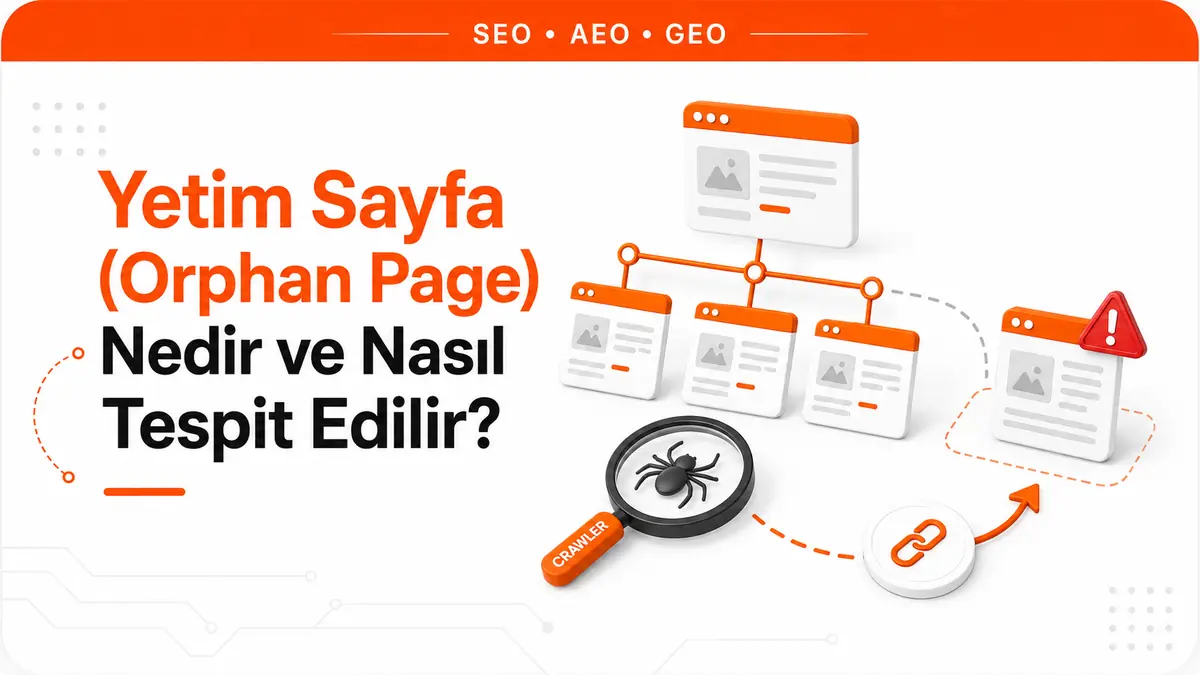
A page sits on the server, its URL works and its content looks complete when it opens. But if there's no path to it from any of the site's menus, articles or listings, that page is living on its own island.
That's where the metaphor ends, because the consequences are entirely concrete. A crawler that starts from the homepage and follows links can never reach this page. Neither can a user browsing the site. The only way to reach the page is to already know its address. These pages are called orphan pages, and the very trait that defines them is what makes them hard to detect: most site audit tools work by following exactly the path that never leads to an orphan page.
What is an orphan page?
An orphan page is a page that is live and responds to requests normally (200 OK) but receives no links from any other page on the same domain. The decisive word in the definition is "no." If there's even a single internal link, the page is no longer an orphan; at most it's a weakly linked page, and an entirely different fix applies to it.
In practice, people often misjudge where the line falls. A page that doesn't appear in the menu but receives a link from within a blog post isn't an orphan. By contrast, a page listed only in the sitemap is an orphan, because a sitemap is a list of addresses, not a link. A page that receives only external links is also an orphan from the perspective of its own site's network.
There's one category of exceptions, and it should be set aside from the start: pages deliberately left unlinked. A thank-you page shown after a form submission, a payment return page or a landing page made solely for an ad campaign fits the technical definition but isn't a problem. These are pages that shouldn't be reachable from within the site anyway. When compiling a list of orphan pages, flagging and setting this group aside makes the rest of the list meaningful.
How does a page become an orphan?
Orphan pages are rarely created one at a time. They almost always appear in batches, as a by-product of some structural event.
- Campaign and seasonal pages. The sale ends, the homepage banner and the menu link are removed, and the page itself stays where it is.
- Deleted categories. A category or tag is deleted; the product and article URLs under it live on, but that category was the only path to them.
- Moved content. The URL structure changes and a redirect is set up from the old address to the new one, but internal links still point to the old address or nothing links to the new one at all.
- Template changes. When the theme or page template changes, the "related content" block, submenu or pagination links disappear. This is the scenario that produces the most orphan pages in one go, because dozens of pages lose their links at the same time and nothing looks broken from the outside.
- Filtered and parameterized URLs. Some variants of listing pages make it into the sitemap but receive no links from anywhere.
- Content that never enters the publishing flow. Content that's moved from draft to published in the CMS but never shows up in a category listing or archive page is orphaned from birth.
What this list has in common is that in none of these cases did the person who published the page make a mistake. The page was produced correctly, and then the link structure around it changed. That's why an orphan page audit isn't a one-time cleanup but a check repeated after structural changes.
The three separate costs of an orphan page
An orphan page is usually described as a single problem, but it actually causes three independent kinds of harm, and their fixes aren't the same.
Discovery. The wording in Google's own starter guide is clear: Google finds pages primarily through links on other pages it has already crawled. Google Search documentation describes URL discovery with the same logic: some pages are known because Google has already visited them, some are found through a link from a known page to a new one, and some are found through a submitted sitemap. An orphan page can't use the strongest of these three channels, and its discovery is left entirely to secondary channels.
Context signal. Even if the discovery problem is somehow solved, internal links have a second job. A link signals which topic cluster the page belongs to, what phrase describes it and where it sits within the site. A line in a sitemap carries none of this. An orphan page that has been indexed still lacks this context.
User path. Someone who arrives at an orphan page from search has walked into a dead end. If the page doesn't link to a related product, a related service or a next step, the visit has nowhere to go. This is the easiest cost to measure but the one most often overlooked.
Why isn't being in the sitemap enough?
The most common false assumption about orphan pages is that as long as a page is in the sitemap, there's no problem. Google's documentation undermines this assumption in two separate places.
The first is scope: a sitemap helps search engines discover the URLs on a site, but it doesn't guarantee that every item in it will be crawled and indexed. Google itself describes submitting a sitemap as merely a hint; there's no guarantee that Google will download the file or use it to crawl the URLs.
The second is the recommendation itself: the same documentation says that if pages are properly linked, Google can usually discover most of a site anyway, and it defines "properly linked" clearly. Every page you care about should be reachable through some form of navigation, meaning the menu or links you've placed on pages. The same passage notes that on large sites it becomes harder to ensure every page receives a link from at least one other page, so Googlebot may not discover some new pages. Google roughly describes a small site as around five hundred pages or fewer; beyond that, link gaps become less and less likely to close on their own.
So a sitemap and internal links don't do the same job, and neither is a backup for the other. A sitemap declares an address. A link declares the address along with context, phrasing and position. Being in the sitemap may make a page discoverable, but it doesn't define the page's place within the site.
How do you detect orphan pages?
The logic of detection fits in one sentence: an orphan page is a page that a link-following crawl can't find but that actually exists on the site. That's why it can't be found with a single list. You need at least two lists, and only one of them can be a crawl.
Comparing the sitemap with the crawl list
This is the core of the method. The first list comes from a crawl that starts at the homepage and follows only links: every URL the crawler can reach on its own. The second list comes from another source of the site's existing URLs. That source can be the sitemap, a page export from the CMS, the landing page report in your analytics tool or the URLs Search Console knows about. Every URL that appears in the second list but not the first is an orphan page candidate.
Desktop crawlers such as Screaming Frog run this comparison for you: they add the sitemap to the crawl as a separate source and report URLs found only in the sitemap under their own heading. The only real risk here is the crawl settings. When JavaScript-generated menus aren't rendered, robots rules cut the crawl short or parameterized URLs are excluded, the list becomes misleadingly inflated. Before declaring a URL an orphan, you need to understand why the crawl couldn't see it.
Which Search Console signals are useful?
Search Console doesn't offer a report that lists orphan pages directly, but it gives strong clues in three places. The Page indexing report shows the URLs Google knows about and their status; here, the "Discovered - currently not indexed" status tells you that Google found the URL but hasn't crawled it yet. The URL Inspection tool reveals how Google found a single URL. The third is used less often and needs to be read in reverse: the internal "Top linked pages" table in the Links report is, as its name says, sorted by link count. A page with zero internal links never appears in this table. So what you're looking for isn't the pages at the top of the list but the ones missing from it entirely. We cover these kinds of reverse readings of Search Console data, and what the reports actually measure, in detail in our Search Console data tracking guide.
Server logs and analytics
Server logs are the only source that shows which URLs Googlebot actually requests. A URL that's in the sitemap but hasn't been requested for months is a strong candidate. Log analysis takes effort to set up and interpret, so it isn't the first step on a site with a few hundred pages; on sites with tens of thousands of URLs, however, it uncovers cases that a comparison crawl alone can't solve. On the analytics side, you look for a different signal: pages that get traffic only from ads or email and are never visited through internal navigation. These are usually either deliberate landing pages or forgotten campaign pages.
Is the page you found worth keeping? A decision framework
Detection produces a list, and a list isn't a work order in itself. The biggest time sink in an orphan page audit is trying to give every URL on the list an internal link. A significant share of the pages deserve to be removed rather than linked. The decision comes down to two questions: does the page still meet a genuine need, and does its content overlap with another page?
| Page status | What it means | Decision |
|---|---|---|
| Has search impressions and traffic, content is still valid | The page is doing its job; it just isn't connected to the network | Link to it from the relevant parent page and topical neighbors, and add it to appropriate listings |
| No impressions, but the content is valid and has no equivalent | Both discovery and context are missing | Set up the links, review the title and content quality, keep it in the sitemap |
| Content largely overlaps with another page | There are two pages for the same need | Merge into the stronger page and redirect the old URL to it |
| Expired campaign, discontinued product, page with no demand | The page's function has ended | If a replacement page exists, redirect; if not, take it down and remove it from the sitemap |
| Thank-you page, payment return, ad-specific landing page | Deliberately unlinked | Remove it from the list, block it from search if needed and keep it out of the sitemap |
Where should a valuable page connect to the network?
For a page you decide to keep, the link source isn't chosen at random. In practice, three sources work together: the parent page the page naturally sits under (a category, service hub or topic hub), the two or three closest pieces of content by topic and, if needed, template-level listings. It makes sense to place the link within the body text, using a phrase that describes what the page is about; pasting a bare URL solves discovery but not context.
A single link takes a page out of orphan status. However, Google's criterion isn't the number of links but reachability: the page you care about is expected to be reachable through some form of navigation. It's accurate to say a newly added link will speed up discovery, but wrong to say it will guarantee indexing; Google doesn't crawl every page it discovers and doesn't index every page it crawls.
Before connecting the page to the network, it's also worth looking at the page's own condition. A page that has sat unlinked for years often has a title, description and heading hierarchy that don't fit the current template. Closing these gaps with a page-level on-page SEO analysis before adding links makes sure the page is actually useful once it's connected.
Which page links to which, with what phrasing and at what depth, is a separate topic in its own right. We cover building a link architecture, anchor selection, click depth and the difference between menu and in-content links in detail in our internal linking guide. This article's job is to find the page and decide its fate; that article's job is to connect the page you found to the right place.
Merging, redirecting and removing low-value pages
For the rest of the list, there are three separate paths, and the differences between them matter.
Merging. If the content overlaps with another page, consolidating into the stronger one is healthier than keeping two weak pages alive. The old URL is permanently redirected to the merged page. The redirect target must genuinely match the topic; redirecting dozens of orphan pages en masse to the homepage isn't a solution but an attempt to make the problem invisible.
Removing. A page that no longer has any demand is taken down. For a permanently removed URL, it's enough for the server to report that the page no longer exists. The step most often skipped when deciding to remove is this: the URL must also be removed from the sitemap. Otherwise, the sitemap keeps declaring pages that no longer exist.
Blocking from search. If the page needs to stay but shouldn't appear in search results (thank-you pages, filter variants, internal-use pages), use a directive that prevents indexing. In this case, keep the page out of the sitemap, because a sitemap is a declaration that means "I want these pages indexed."
A routine that stops orphan pages from being created
After an audit, the list gets cleaned up, and a few months later a similar list forms again. That's not because the cleanup was incomplete, but because the events that leave pages orphaned are part of the routine. Five habits noticeably slow down this cycle.
- One question before publishing. Before a new page goes live, the question "which page will link to this one?" gets answered. If there's no answer, the page isn't ready yet.
- A shutdown protocol. When a category, tag or listing is closed, the link sources for the URLs under it are reassigned one by one. The shutdown isn't considered complete until it's decided what happens to the pages underneath.
- A mandatory check after template changes. If the theme, menu structure or related content blocks have changed, the comparison crawl is run again. This is the scenario that affects the most pages at once, and it can't be spotted by eye.
- An end-of-life decision for campaign pages. When a campaign page is created, it's decided at the same time whether the page will stay, be redirected or be removed when the campaign ends.
- Periodic comparison. Frequency depends on site size. On a site with a few hundred pages, once every three months may be enough, while on large sites that are constantly adding products and content, a monthly check is more realistic.
Frequently Asked Questions
Is an orphan page a Google penalty?
No. An orphan page isn't a penalty or a manual action; it's a discovery and context problem. An orphan page may even be indexed and getting search traffic; it's still an orphan because it isn't connected to the internal network. The problem isn't that the page is being penalized but that it never reaches the visibility it could have.
Does a page that receives external links still count as an orphan?
Yes. External links can largely solve the discovery problem, because Google can find the page through links on other sites it already crawls. But because the page isn't connected to its own site's topic network, it still lacks the internal context signal, and visitors can't move from that page to the rest of the site. An orphan page with external links is the case that delivers the fastest results once fixed.
How many internal links should a page get?
There's no fixed number, and targeting a number is the wrong measure. The criterion in Google's own wording is reachability: every page you care about should be reachable through some form of navigation. In practice, a single link takes a page out of orphan status, while links from several related pages produce a more meaningful result for establishing topical context.



